



If you've ever come out of the water wondering whether that wave was as good as you remember, you already know what Cam Rewind is for. Having the footage was never the hard part: finding your wave in it was.
That's why we rebuilt it from scratch.
How it used to work
Cam Rewind was a grid of buttons. Each button was a 10-minute clip, and they all showed the same thumbnail. To find your wave, you had to roughly remember the time, open a clip, watch it, close it and try the next one. Watching a full hour took six clicks. And nothing told you what the ocean was doing in each clip: you were picking blind.
The whole day, on a single line
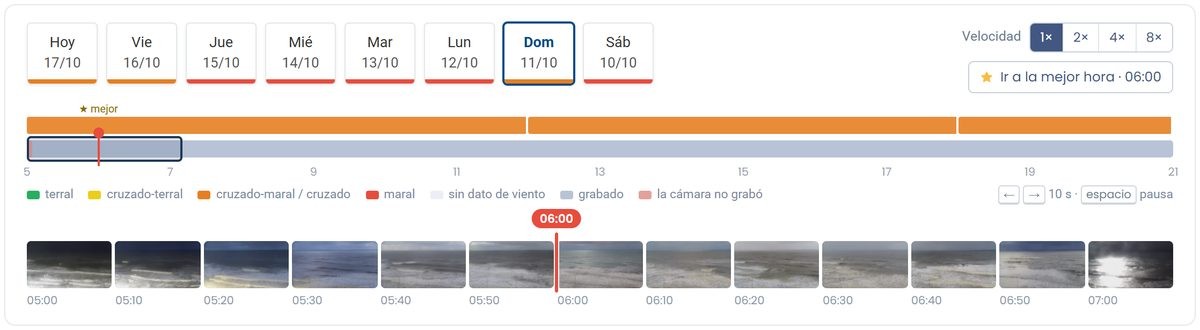
Now the day fits on a timeline, from 5 in the morning to 9 at night. You drag and the video follows, with no cuts between one clip and the next. The 10-minute files are still there behind the scenes, but you don't have to think about them anymore. You remember "I paddled out around 11," not "the 11:06 clip," and now that's how you search.
See before you hit play
Below the timeline there's a strip of thumbnails showing what the camera recorded. Before you hit play, you can already see if there were people in the water, if the sets were rolling in or if it was flat. And if the camera wasn't recording for a while, the timeline shows it instead of pretending nothing happened.
Waves and wind, right next to the video
Above the timeline you'll see what the waves and wind were like in the morning, at midday and in the afternoon, with the best window of the day highlighted. That way you can spot at a glance when the wind cleaned up or when the size picked up. And with Go to best time you jump straight to the best moment.
We also tell you where the data comes from: it's what Lineup's forecast model estimated for that window, not a measurement taken in the water.
Faster when you need it
You can watch at 1×, 2×, 4× or 8×. Ten minutes of flat ocean go by in just over a minute, and when something shows up, you slow down and watch it calmly.
The last 7 days, with Premium
With Lineup Premium you get the last 7 days, day by day, in the chips below the timeline. Missed Tuesday's swell? It's there. Want to see how it was breaking over the weekend at low tide? That too. And "Today" means today in the spot's time zone, not your phone's.
If you're on Free, you can still get in: you'll see today's best window at that spot and, from there, upgrade to Premium.

How to use it, in 3 steps
- Go to your spot's page and tap Cam Rewind.
- Pick the day in the chips and drag along the timeline, or tap Go to best time.
- When you find your wave, pause, watch it at 1× and, if you want to keep it, tap Download these 10 min.
See you in the water. And afterward, in the rewind.